Slack Integration
Connect ProductBridge to Slack to capture feedback via the /productbridge slash command, @mentions, emoji reactions, and AI-powered analysis of channel messages — with optional confirmation replies in the thread.

Where to find it
Open Slack in ProductBridge
Sidebar → Connect Sources → Slack
Direct link: https://app.productbridge.io/dashboard/settings/integrations/slack
In-app path: Sidebar → Connect Sources → Slack
Requires: integration:view to see the integration, integration:manage to connect or disconnect it.
All integrations: https://app.productbridge.io/dashboard/settings/integrations
Overview
The Slack integration connects ProductBridge to your Slack workspace so your team can capture product feedback exactly where conversations already happen — no context switching, no separate tools.
There are four ways feedback flows from Slack into ProductBridge:
-
Slash command
/productbridge— A teammate runs the slash command in any channel, fills out a small modal, and the post is created instantly. -
@Mention — A teammate mentions the ProductBridge bot in a channel message to submit feedback explicitly. AI detection is skipped and the message is treated as feedback at high confidence.
-
Emoji reaction — A teammate reacts to any message with the trigger emoji (default
:feedback:) and ProductBridge captures that message as feedback. -
Passive channel monitoring — Messages posted in monitored channels are analyzed by AI. Anything that looks like product feedback (feature requests, bug reports, UX complaints, enhancements, pain points) is captured automatically. Casual chat is ignored.
After feedback is captured, ProductBridge can post a confirmation reply in the thread so the submitter knows their input was recorded.
Prerequisites
-
A Slack workspace with permission to install apps
-
A ProductBridge organization with at least one feedback board
-
Channel admin or workspace admin access to invite the bot to private channels (if needed)
Connect Slack
Open the Admin Dashboard
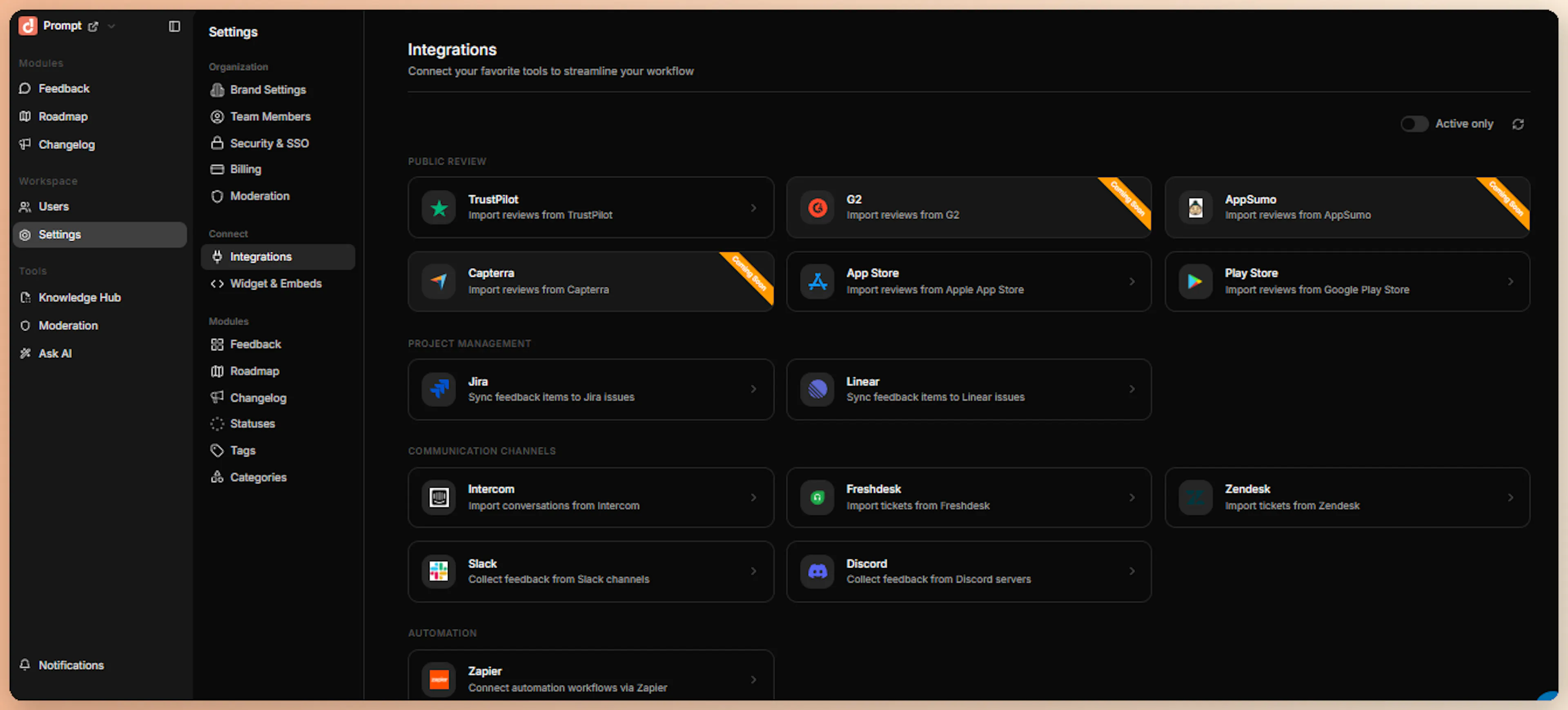
Sign in to your ProductBridge dashboard, click Connect Sources in the sidebar, and select Slack.
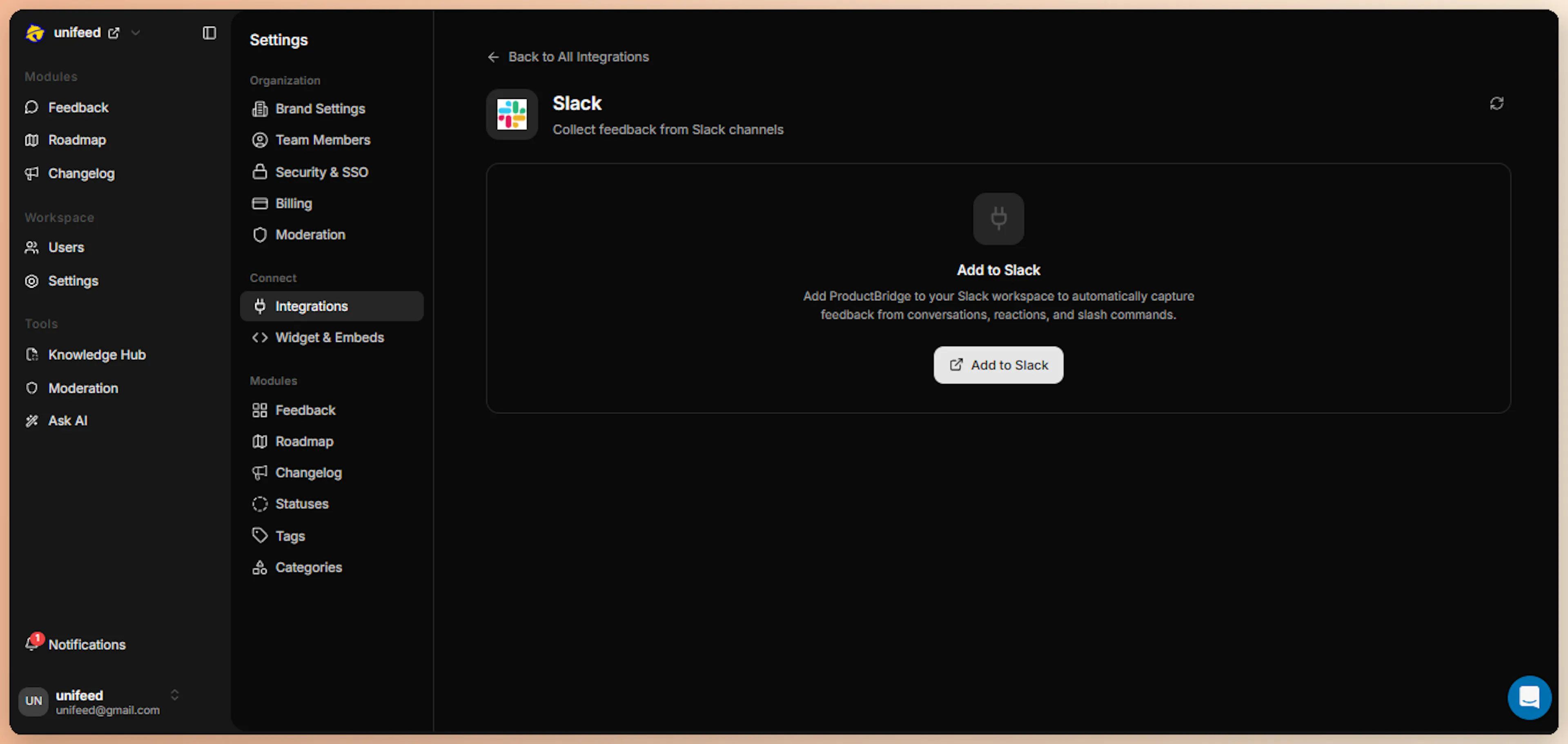
Click Add to Slack
On the Slack integration page, click the Add to Slack button. ProductBridge initiates the Slack OAuth flow and redirects you to Slack's authorization screen.
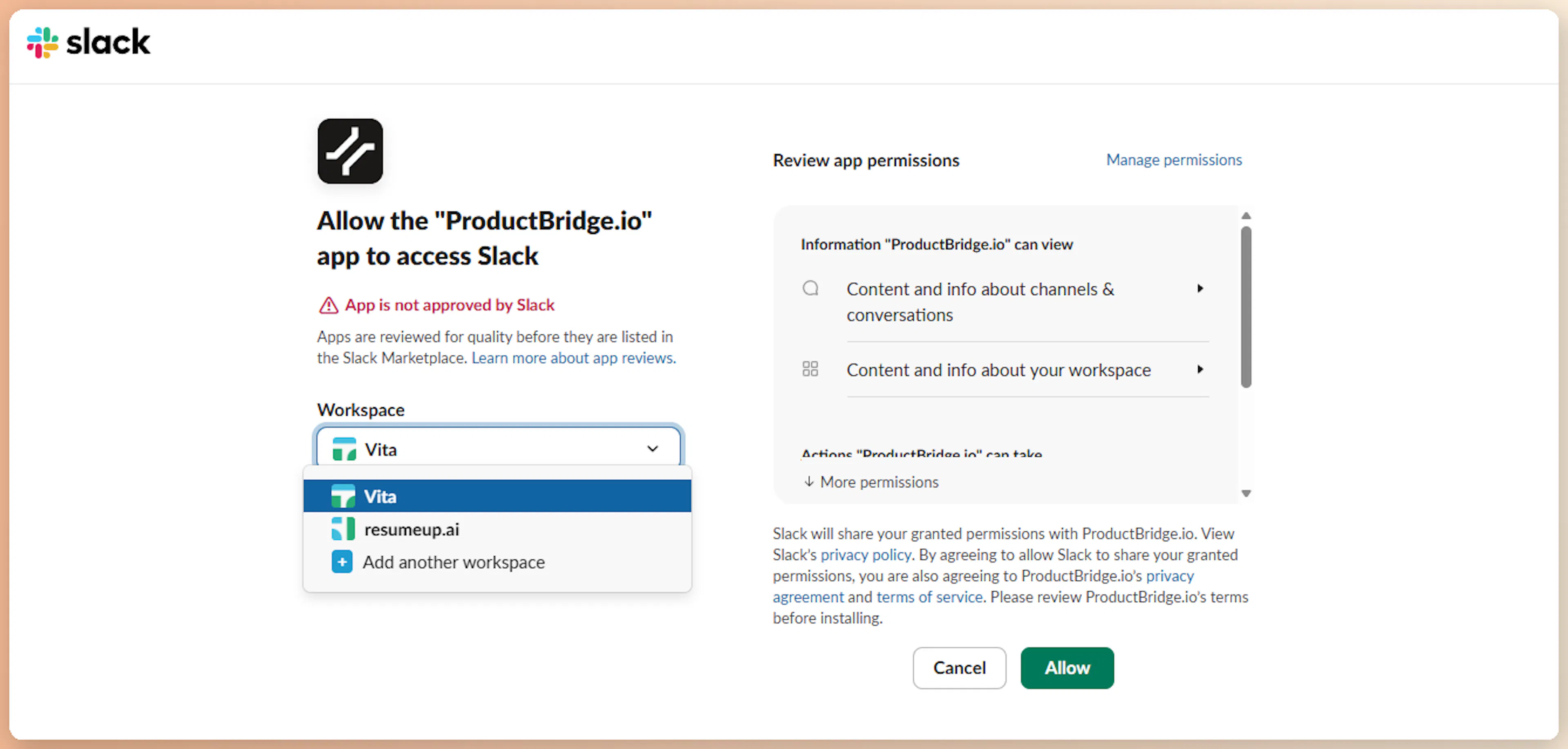
Authorize ProductBridge in Slack
On Slack's OAuth screen, choose the workspace where you want to install ProductBridge. Review the requested scopes:
| Scope | Used For |
|---|---|
app_mentions:read | Detect @mentions of the ProductBridge bot |
channels:history | Read messages in monitored channels |
channels:read | View basic channel info |
chat:write | Post auto-reply confirmations |
commands | Register the /productbridge slash command |
reactions:read | Detect trigger-emoji reactions on messages |
users:read | Identify message authors |
users:read.email | Link Slack users to ProductBridge user profiles |
Click Allow to install the ProductBridge app into your workspace.
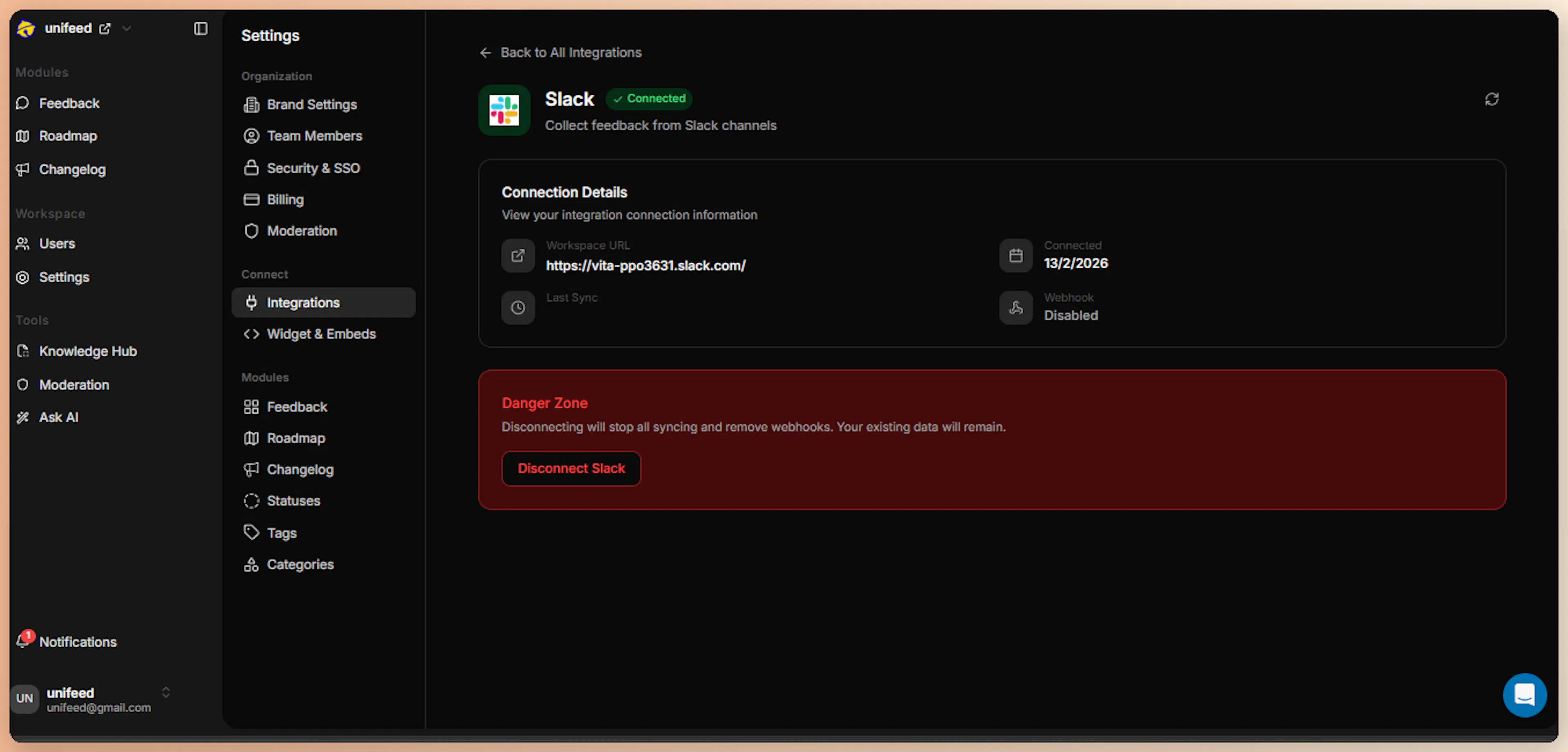
Confirm Connection
After authorization, Slack redirects you back to ProductBridge. The integration status updates to Connected, and the page now displays your workspace name, team ID, and the bot user ID.
Behind the scenes, ProductBridge:
-
Encrypts and stores the bot token
-
Registers the
/productbridgeslash command on your workspace -
Wires the webhook endpoint so Slack can deliver events
What Happens After Install
Immediately after connection:
-
The ProductBridge bot appears in your workspace and can be invited to channels
-
The
/productbridgeslash command is available in every channel where the bot is present -
The webhook endpoint is registered so Slack can deliver messages, mentions, reactions, and command interactions in real time
-
A confirmation appears in the ProductBridge admin UI showing your workspace name and bot user ID
Submit Feedback from Slack
After installation, your team can capture feedback in four ways.
1. Slash Command /productbridge
The fastest way to submit feedback. Run the command in any channel, fill in a short modal, and the post is created instantly.
Run the Slash Command
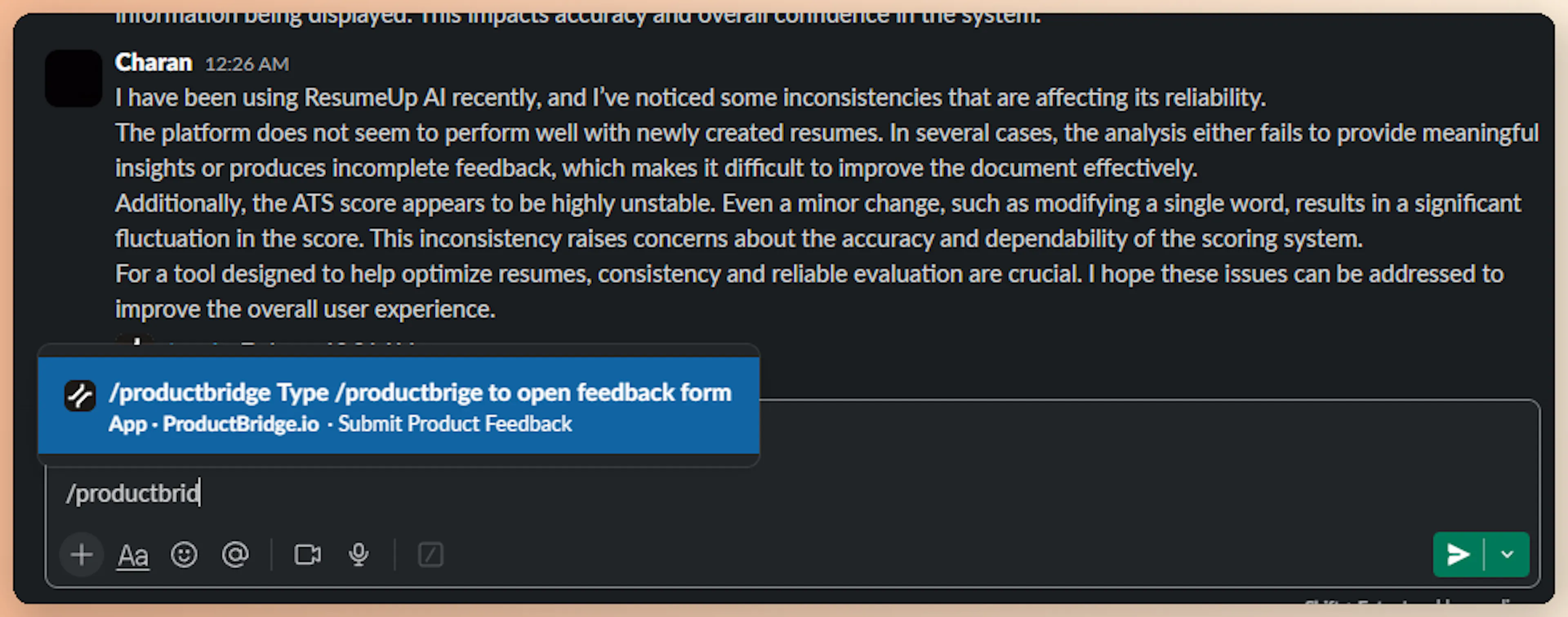
In any channel where the ProductBridge bot is present, type /productbridge and press Enter. Slack shows the registered command as you type.
Fill the Feedback Modal
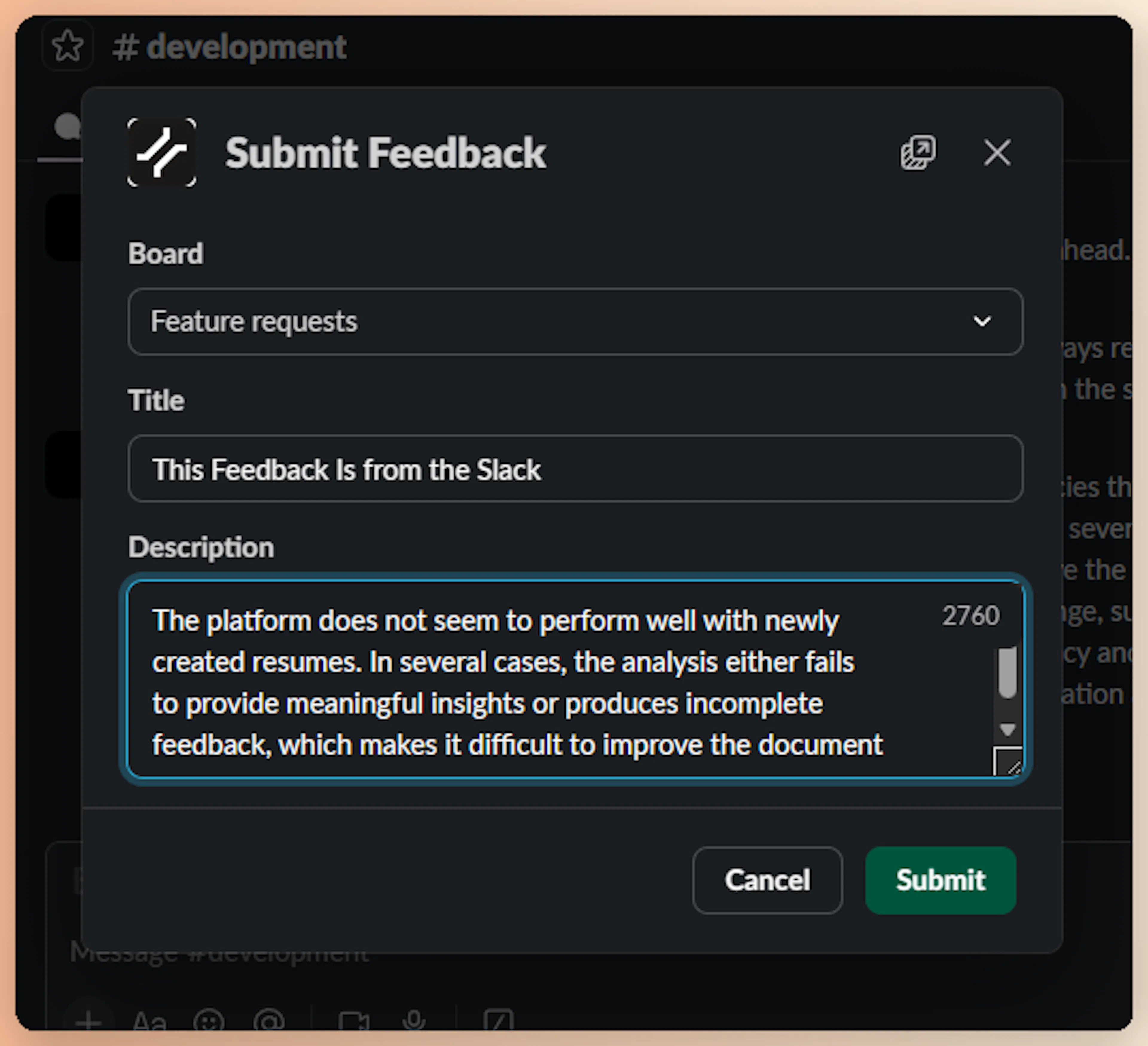
Slack opens a modal form with two fields:
| Field | Required | Limit |
|---|---|---|
| Title | Yes | Up to 150 characters |
| Description | Yes | Up to 3,000 characters (multi-line supported) |
Write a clear title and detailed description, then click Submit.
Get Confirmation
Slack briefly shows a "thinking" indicator while ProductBridge processes the submission. Once the feedback is captured, ProductBridge replies with an ephemeral confirmation message visible only to the submitter — keeping channels clean.
Because the slash command captures intent explicitly, ProductBridge skips AI feedback detection for slash command submissions and assigns 95% confidence by default. The submission still flows through the AI pipeline for extraction, deduplication, and routing — so duplicates are caught and posts land in the correct board automatically.
2. @Mention
Mention the ProductBridge bot in any channel to submit feedback explicitly. AI detection is skipped — the message is treated as feedback at high confidence.
Example:
@ProductBridge The export to CSV button times out for large workspaces. Bug report.
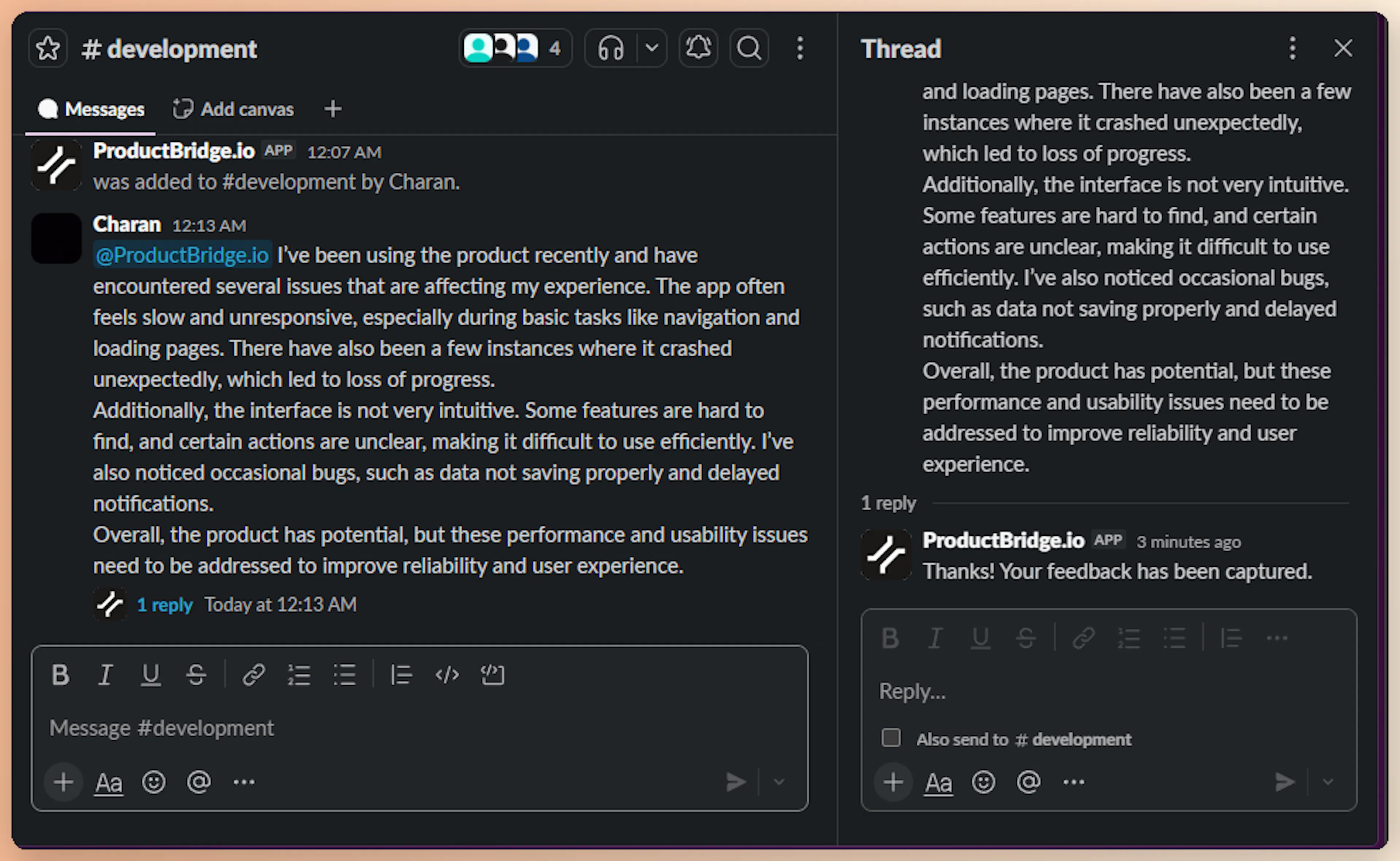
ProductBridge captures the message, runs Extract → Deduplicate → Organize, and creates a feedback post. If auto-reply is enabled, ProductBridge replies in the same thread to confirm capture.
3. Emoji Reaction
React to any message with the trigger emoji to capture that message as feedback — useful when a teammate spots valuable feedback in a conversation they didn't write themselves.
-
The default trigger emoji is
:feedback:; you can change it with thetrigger_emojisetting in the integration configuration -
Reacting with any other emoji does nothing — only the configured trigger emoji captures the message
-
Emoji capture works when the capture mode is
activeorboth
The reacted-to message is treated as explicit feedback, so AI detection is skipped and the message flows straight into extraction, deduplication, and routing.
4. Passive Channel Monitoring
For channels you designate, ProductBridge listens to every message and uses AI to decide whether the message contains product feedback. Casual chat, jokes, and unrelated discussion are ignored — only messages with real product input become feedback posts.
Example — message captured as feedback:
A teammate posts a feature request or bug report in a monitored channel.
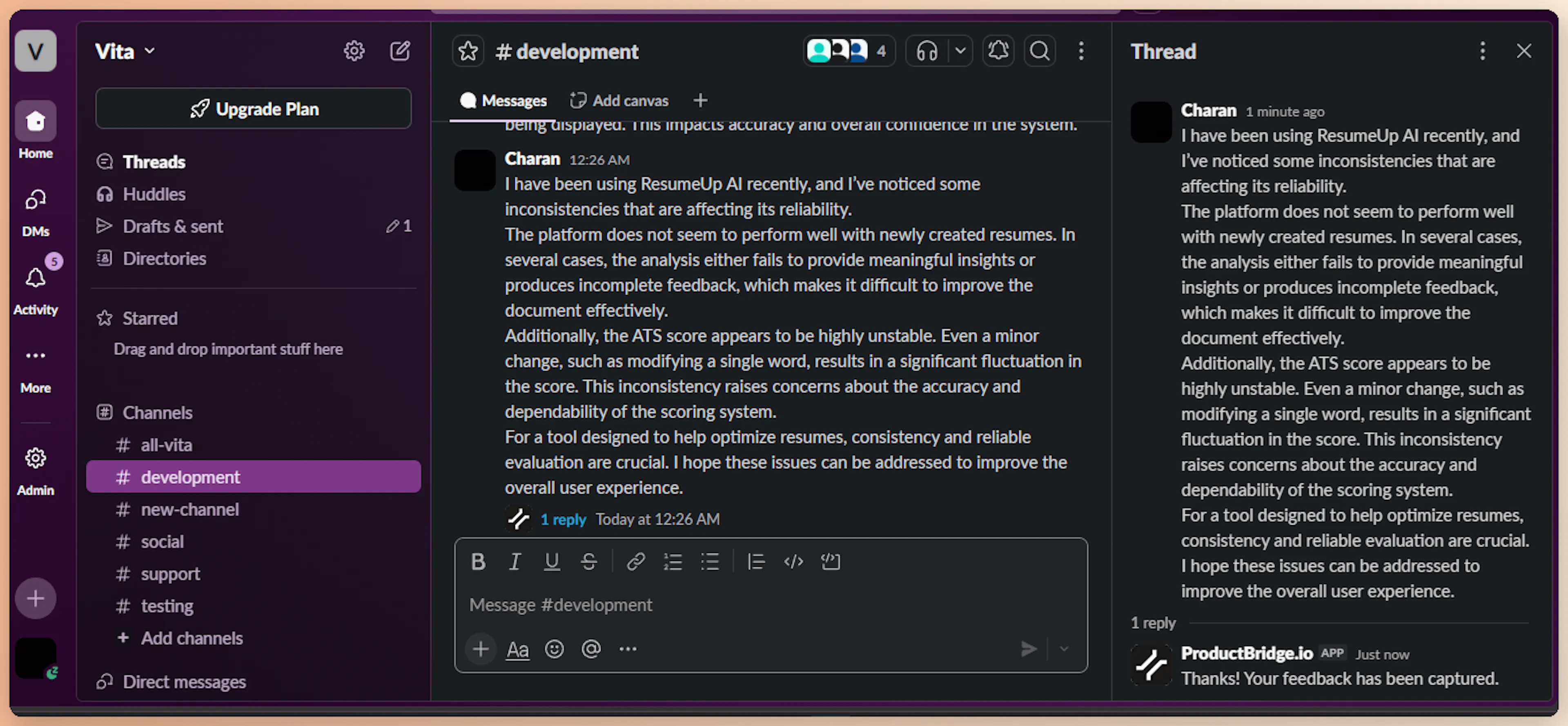
ProductBridge classifies it as feedback, creates a post, and replies in the thread to confirm.
Example — message ignored:
A teammate posts a casual hello, a meeting note, or anything that is clearly not product feedback.

ProductBridge analyzes the message, decides it is not feedback, and silently discards it. No post is created, and no thread reply is posted.
Passive monitoring is configured per channel — only channels you explicitly add to Monitored Channels in integration settings are listened to. Use this for dedicated channels like #product-feedback, #feature-requests, or #bug-reports.
Configure Capture Behavior
Settings live in Connect Sources > Slack.
Capture Mode
Three modes control which signals generate feedback posts:
| Mode | Slash Command | @Mention | Emoji Reaction | Passive Channel Monitoring |
|---|---|---|---|---|
passive | ✓ | — | — | ✓ |
active | ✓ | ✓ | ✓ | — |
both | ✓ | ✓ | ✓ | ✓ |
The default is both — start there to maximize capture, then narrow to passive or active if you find the AI is over- or under-collecting from regular messages.
Monitored Channels
For passive mode, choose which channels ProductBridge should listen to:
-
Empty list — All channels the bot can see are monitored
-
Specific channel IDs — Only the listed channels are processed
For private channels, you must manually invite the bot using /invite @ProductBridge before it can read messages.
Trigger Emoji
The trigger_emoji setting controls which emoji reaction captures a message as feedback. The default is feedback (:feedback:). Pick an emoji your team doesn't use casually so reactions don't create accidental posts.
Auto-Reply
ProductBridge can post a confirmation reply in the Slack thread whenever feedback is captured. Configure:
-
auto_reply— Toggle on/off -
auto_reply_message— Custom acknowledgment text (default: "Thanks! Your feedback has been captured.")
The reply is posted as a thread reply on the original message, so channels stay quiet for everyone else.
How Feedback Is Processed
All Slack feedback (regardless of capture path) flows through ProductBridge's AI pipeline:
| Stage | What Happens |
|---|---|
| Normalize | Message, channel info, user info, thread context, and permalink are combined into a structured format |
| Detect | LLM classifies as feedback (skipped for slash command, @mention, and emoji reaction — auto-confirmed at 0.95 confidence) |
| Extract | LLM extracts title, description, sentiment, priority, feature area, pain points, and customer impact |
| Deduplicate | Semantic search (Voyage AI + Qdrant) checks for similar existing posts. If similarity ≥ 0.85, votes on the existing post instead of creating a duplicate |
| Organize | LLM assigns the right board, category, and tags |
Slack feedback is tagged with source: slack and source_type: integration. The Slack message permalink is stored so you can jump from a feedback post back to the original conversation.
Threaded Conversations
If the captured message is a thread reply, ProductBridge fetches the entire thread for context. The full thread history is included in the feedback extraction so the AI understands the conversation, not just an isolated reply.
What Gets Filtered Out
ProductBridge automatically ignores noise so only meaningful messages reach the AI pipeline:
-
Bot messages and app messages
-
Message edits and deletes
-
Channel join/leave notifications
-
Topic and purpose change announcements
-
Empty or whitespace-only messages
Limitations
No historical backfill — Slack only delivers events in real time. ProductBridge cannot import messages posted before the integration was connected.
-
Direct messages are not supported — Only channel messages, mentions, emoji reactions, and slash commands are processed
-
Private channels require bot invitation — Use
/invite @ProductBridgein each private channel -
One workspace per organization — Connect a different ProductBridge organization for each Slack workspace
Disconnect
To disconnect Slack, open Connect Sources > Slack and click Disconnect. ProductBridge:
-
Marks the integration as
disconnected -
Stops processing incoming Slack events
-
Keeps your existing feedback posts intact (only the live connection is removed)
To fully remove the bot from your workspace, also revoke the app under Slack Workspace Settings > Manage Apps > ProductBridge.