Zendesk Integration
Connect ProductBridge to Zendesk to automatically capture feedback from support tickets and let your agents submit feedback directly from the Zendesk sidebar app.

Where to find it
Open Zendesk in ProductBridge
Sidebar → Connect Sources → Zendesk
Direct link: https://app.productbridge.io/dashboard/settings/integrations/zendesk
In-app path: Sidebar → Connect Sources → Zendesk
Requires: integration:view to see the integration, integration:manage to connect or disconnect it.
All integrations: https://app.productbridge.io/dashboard/settings/integrations
Overview
The Zendesk integration connects your Zendesk workspace to ProductBridge so you can capture product feedback the moment it surfaces in support — without leaving Zendesk. Once installed, the ProductBridge app appears inside Zendesk as a sidebar app, and every ticket that reaches solved or closed status is analyzed by AI to extract feature requests, bug reports, and pain points automatically.
There are two ways feedback flows from Zendesk into ProductBridge:
-
Sidebar App — Support agents search existing feedback, vote on posts, or create new feedback posts directly from any Zendesk ticket — no context switching required.
-
Automatic Ticket Analysis — When a ticket is solved or closed, ProductBridge receives a webhook event, fetches the full conversation, and runs it through an AI pipeline. Tickets that contain product feedback automatically become posts.
Prerequisites
-
A Zendesk account with Admin access
-
A ProductBridge organization with at least one feedback board configured
Connect Zendesk
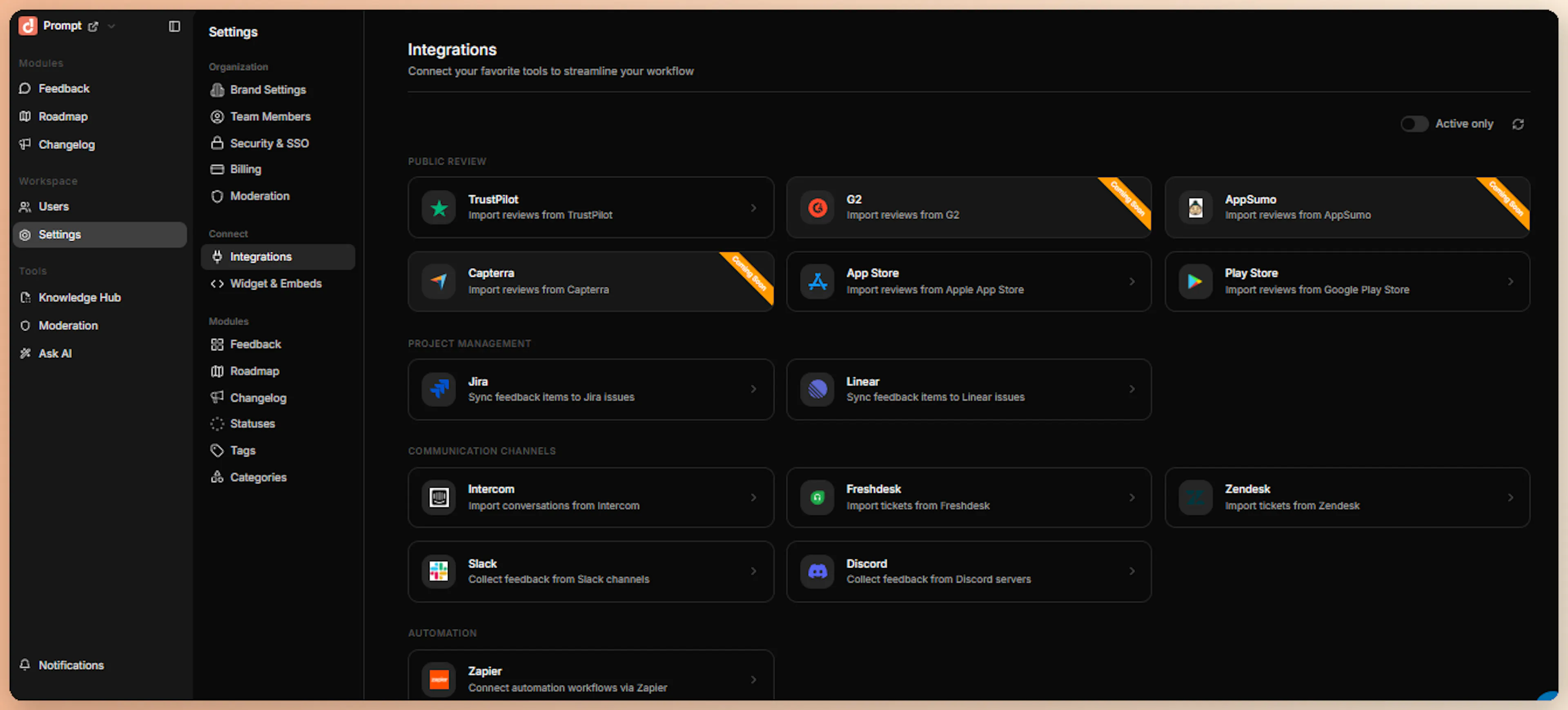
Open the Integrations catalog
Sign in to your ProductBridge dashboard, click Connect Sources in the sidebar, and select Zendesk.
Enter Your Subdomain and Connect
On the Zendesk integration page, enter your Zendesk subdomain (e.g., yourcompany for yourcompany.zendesk.com). Optionally enable Import historical data and choose a window between 1 and 30 days — this is off by default. Then click Connect Zendesk.
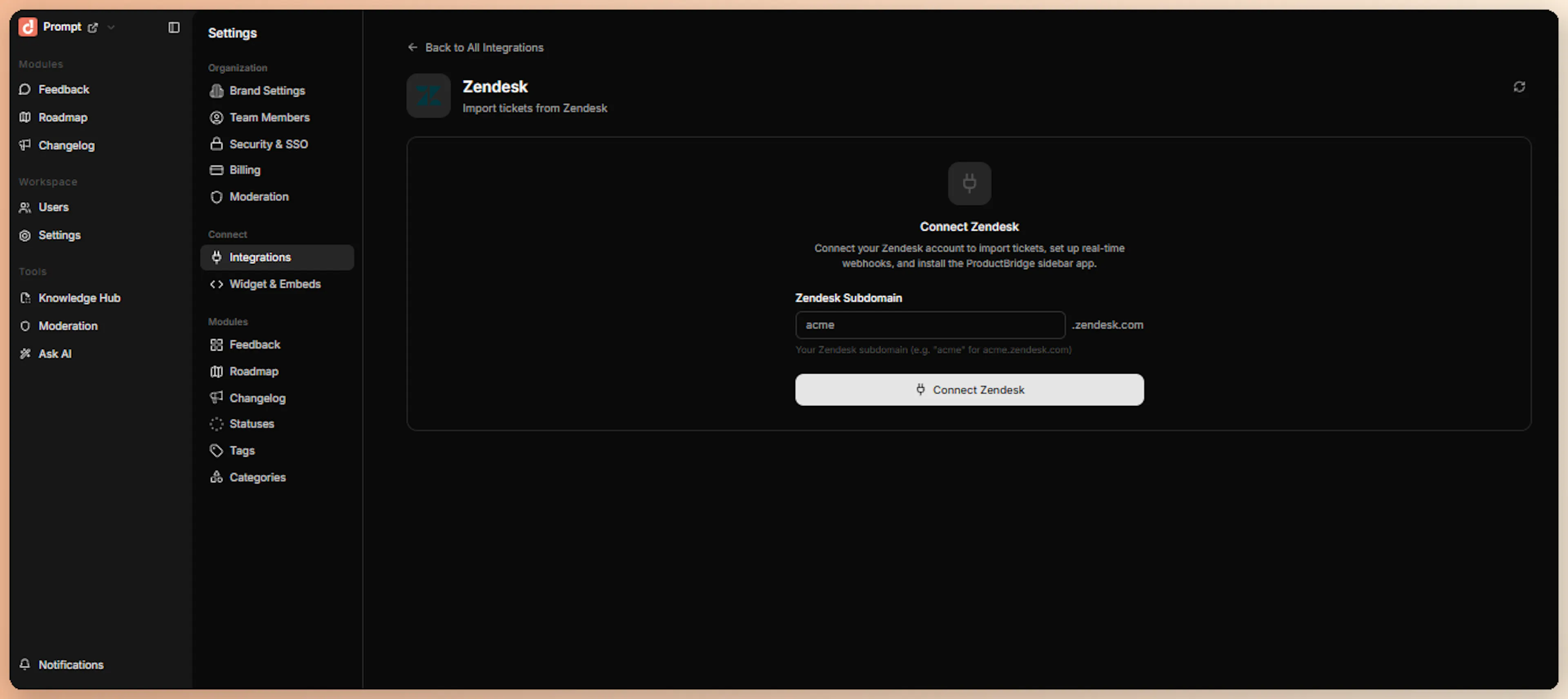
That's all you need to provide — no API tokens or credentials. ProductBridge redirects you to Zendesk to authorize the connection with OAuth.
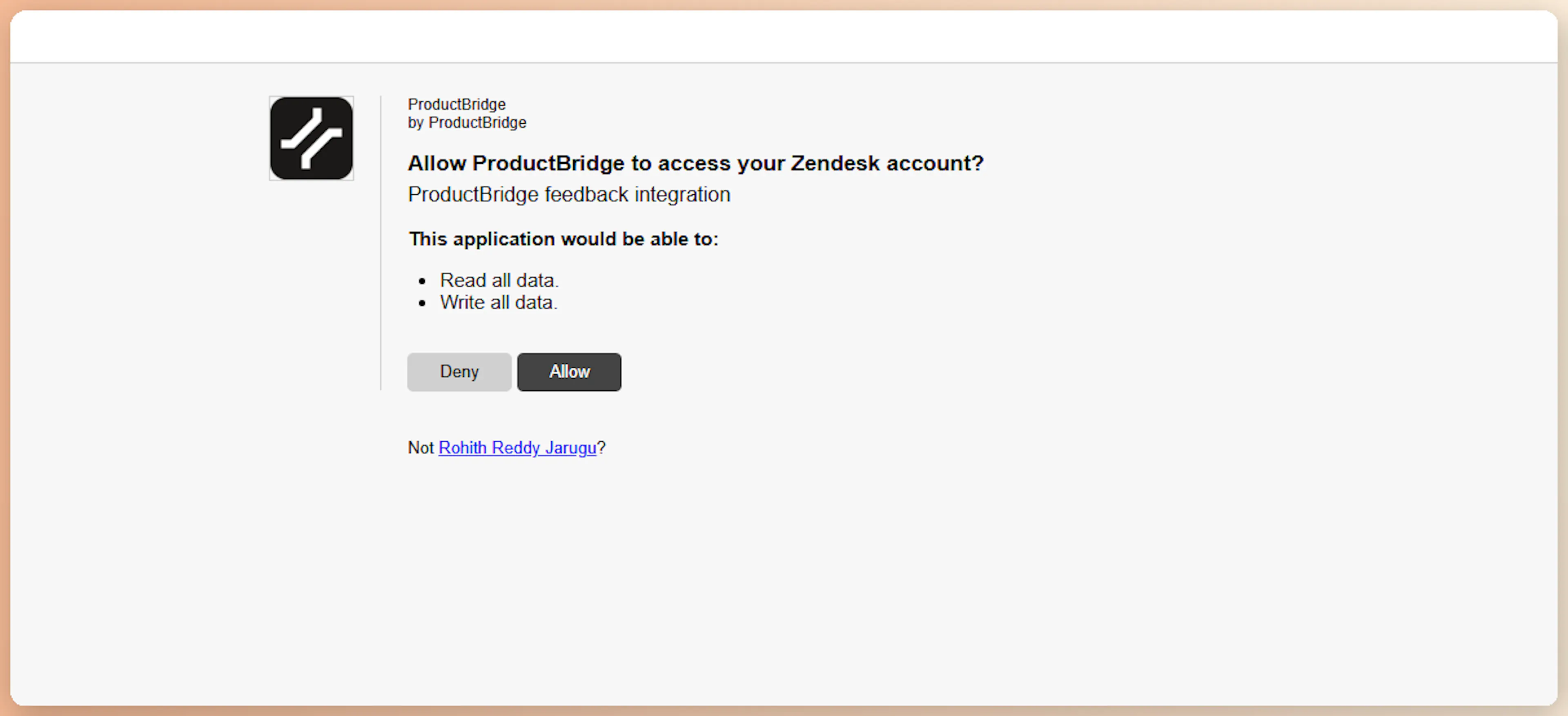
Authorize in Zendesk
On Zendesk's authorization screen, click Allow. ProductBridge then automatically sets up:
-
A "ProductBridge Feedback" webhook subscribed to ticket events
-
A Zendesk trigger that fires on ticket Create and Change events
-
The ProductBridge sidebar app installed into your Zendesk workspace
Confirm Connection
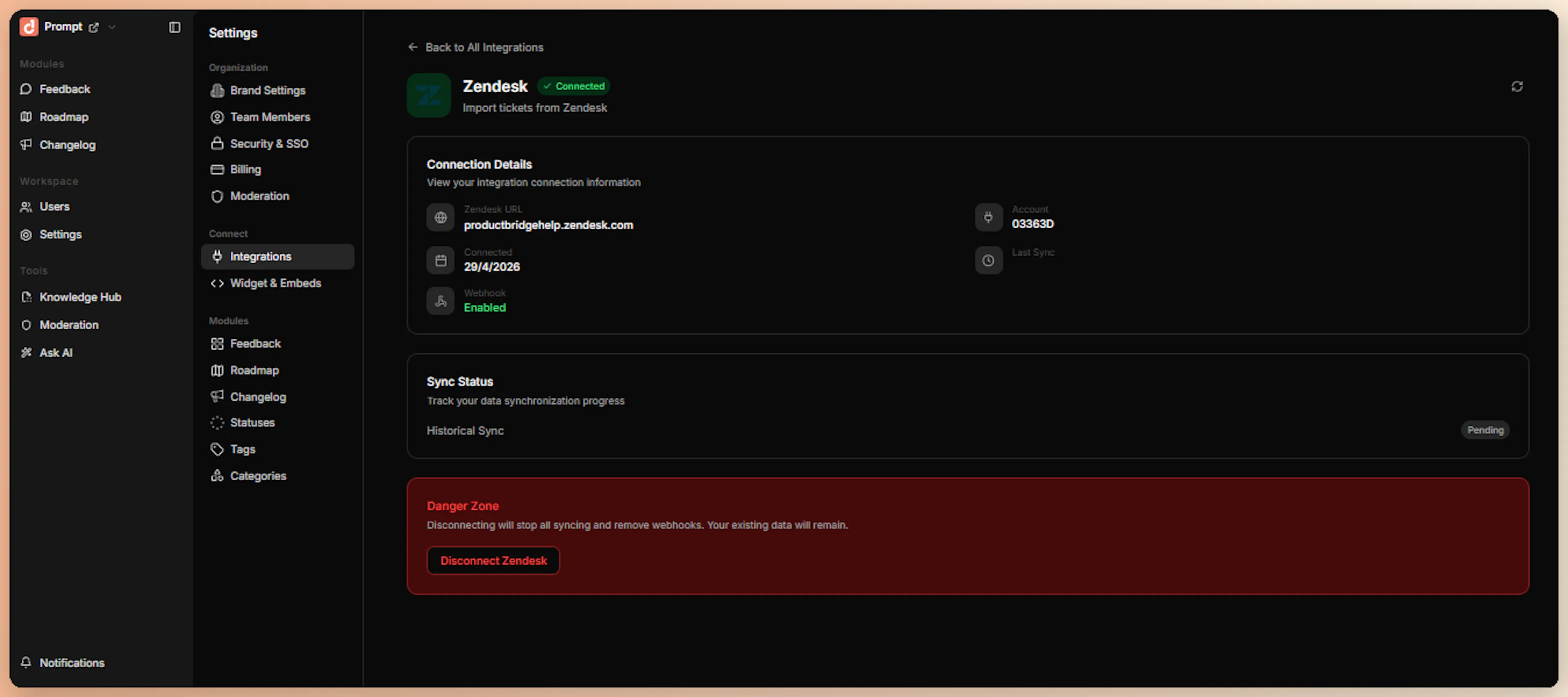
After setup completes, the integration status updates to Connected, and the page displays your Zendesk subdomain, account name, and the registered webhook and trigger IDs.
If you enabled Import historical data, ProductBridge begins backfilling solved and closed tickets from your chosen window in the background.
What Happens After Install
Immediately after connection, ProductBridge:
-
Encrypts and stores your access token and credentials
-
Creates a "ProductBridge Feedback" webhook in Zendesk subscribed to all conditional ticket events
-
Registers a Zendesk trigger that fires on ticket Create and Change events, delivering ticket ID, subject, status, priority, tags, and requester info
-
Installs the ProductBridge sidebar app in your Zendesk workspace, visible in every ticket's details panel
-
Queues a historical import of solved and closed tickets for AI analysis — only if you enabled it during connect
Submit Feedback from Zendesk
After installation, your team can capture feedback in two ways.
1. Sidebar App
When the ProductBridge app is installed, it appears in the ticket details panel (right sidebar) of every Zendesk ticket. Agents can search existing feedback, vote on posts, create new posts, and link tickets — all without leaving Zendesk.
How it works:
Open a Ticket in Zendesk
Navigate to any ticket in your Zendesk Inbox. The ProductBridge sidebar app appears in the right panel showing your 10 most recent feedback posts
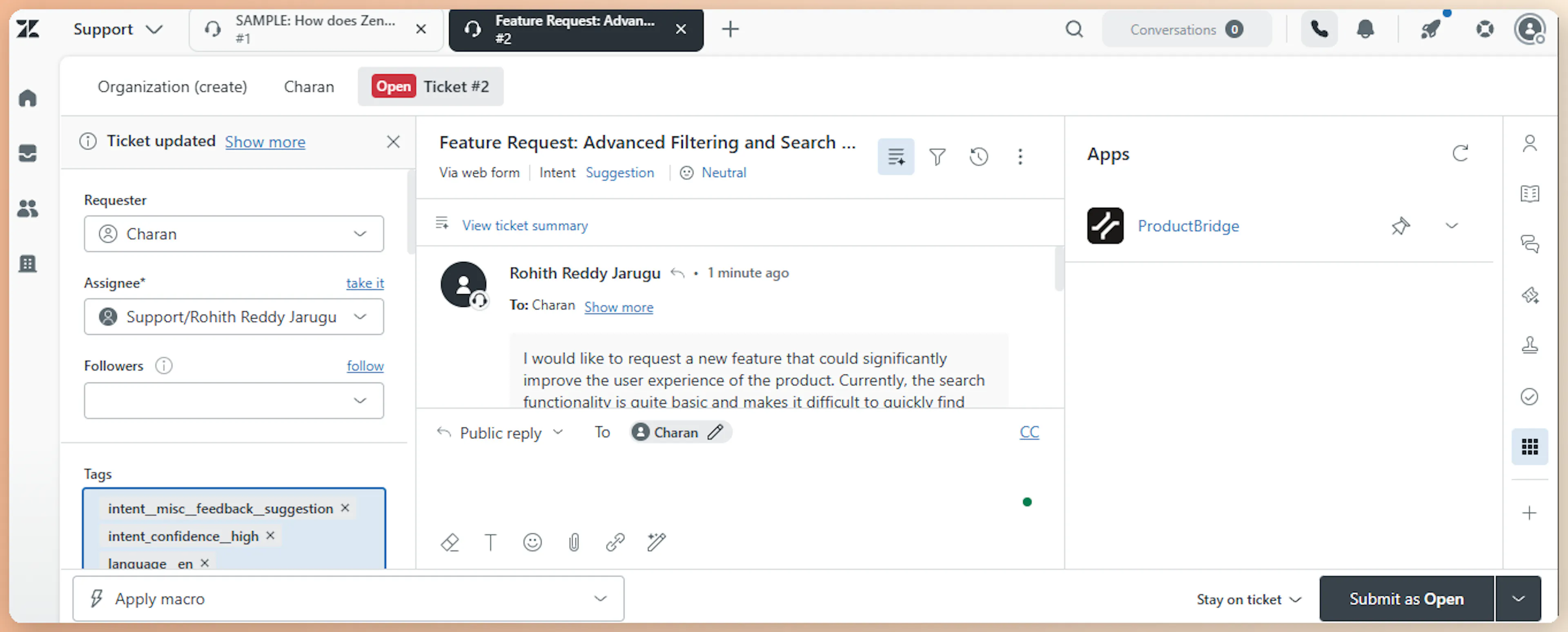
Search Existing Feedback
Use the search bar to check whether the user's input already matches a known feedback item. Type a keyword and ProductBridge returns the closest matching posts.
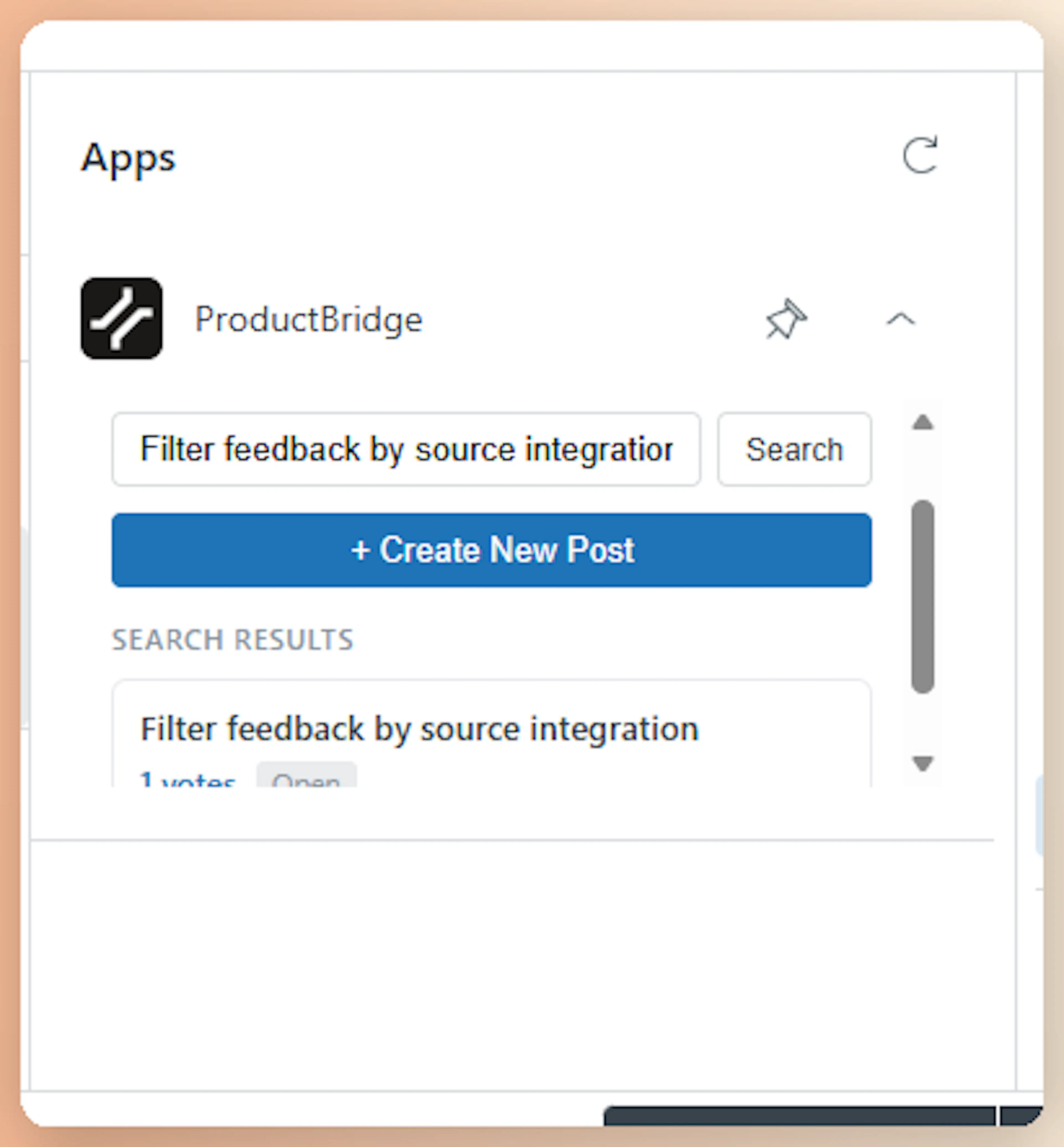
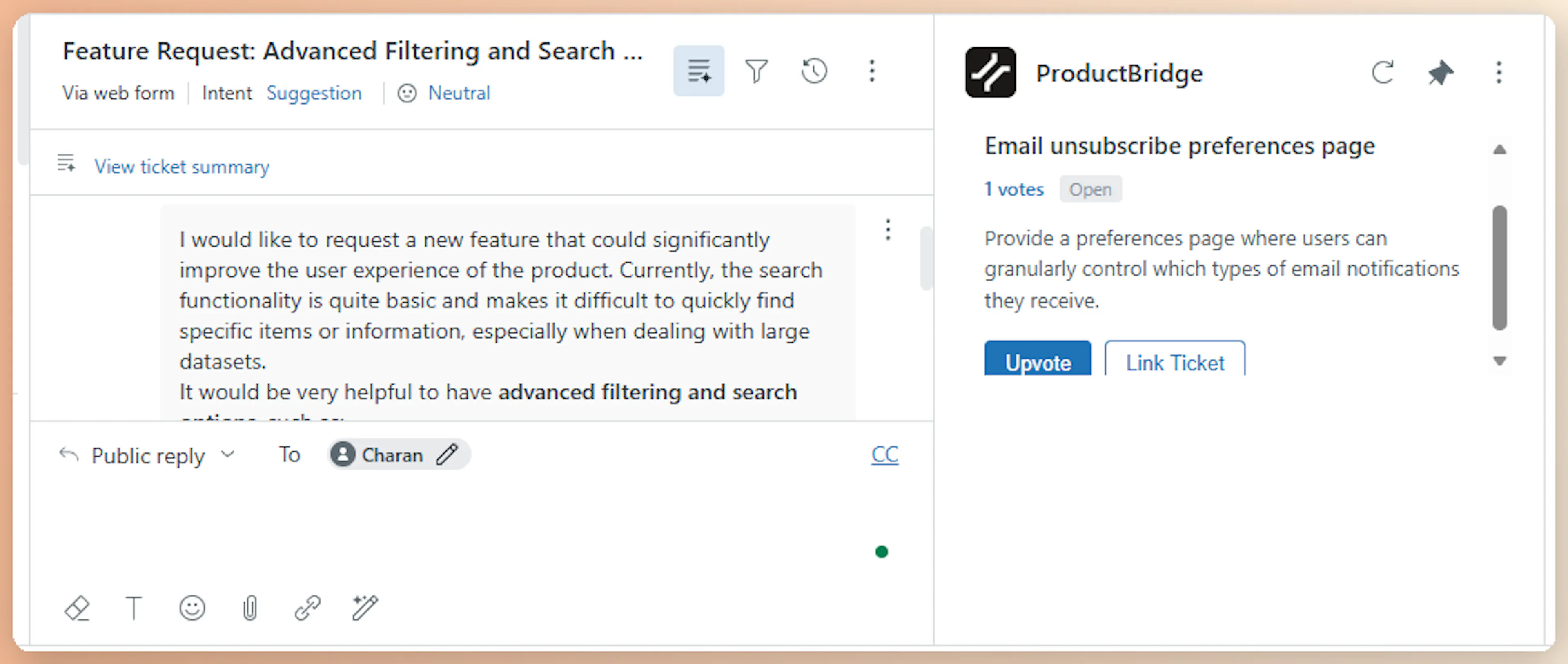
Upvote or Create New
If an existing post matches, click it to view the details and add a vote. If the feedback is new, click Create New Post.
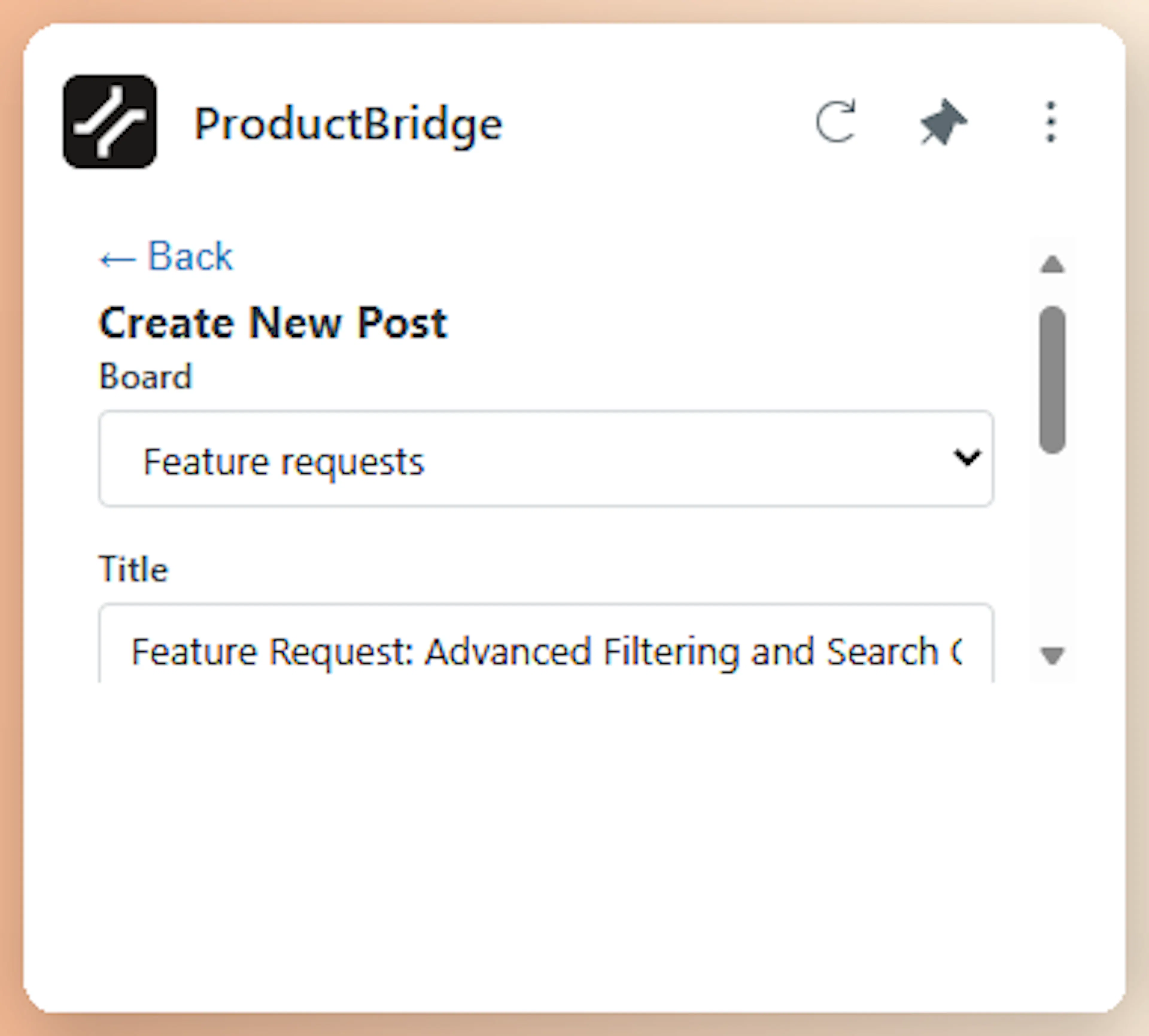
Fill the Feedback Form
Select a target board, enter a title, and add a description. The form is pre-filled with customer context from the active Zendesk ticket so authorship and source metadata are linked automatically.
Submit
Click Submit. The post is created instantly, tagged and auto-approved since a teammate created it.
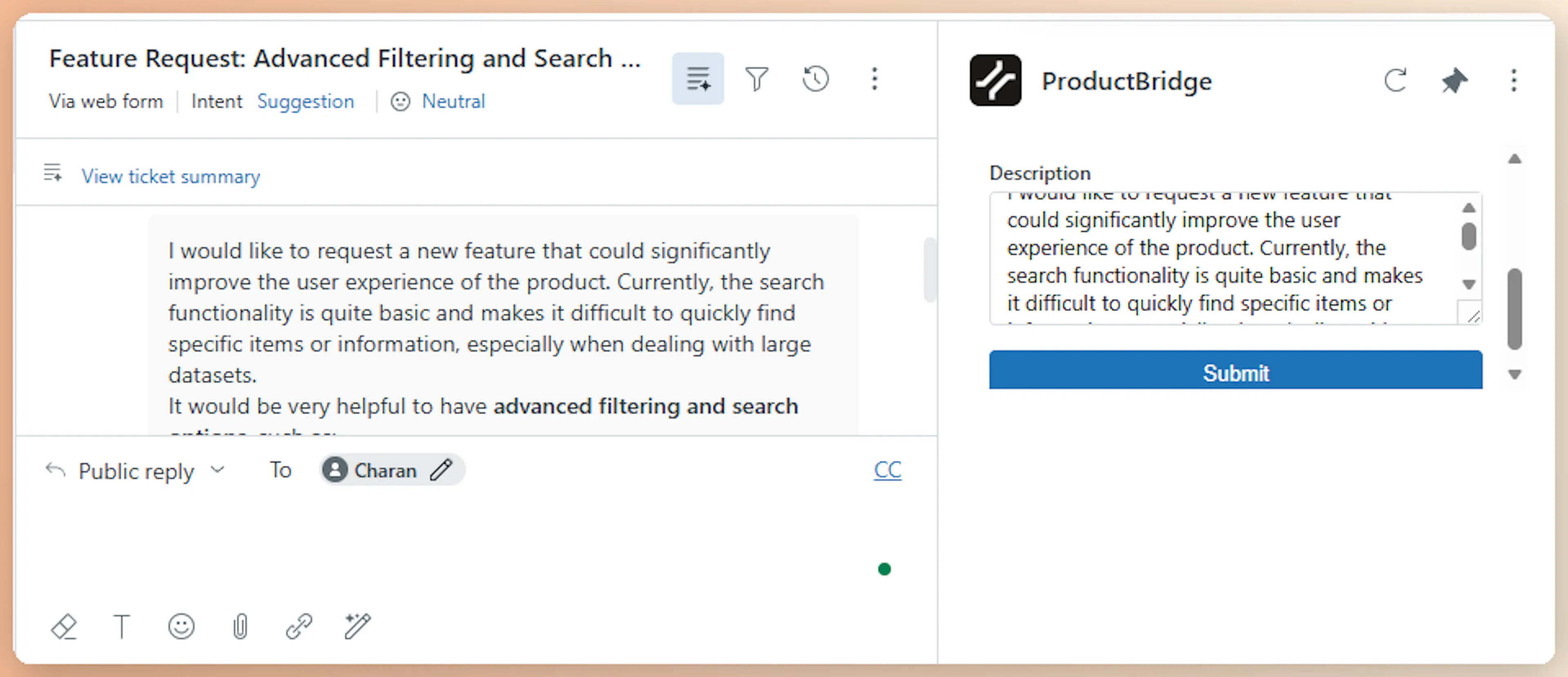
Agents can also link an existing feedback post to the current ticket directly from the sidebar without creating a new post — useful when a customer mentions something already tracked.
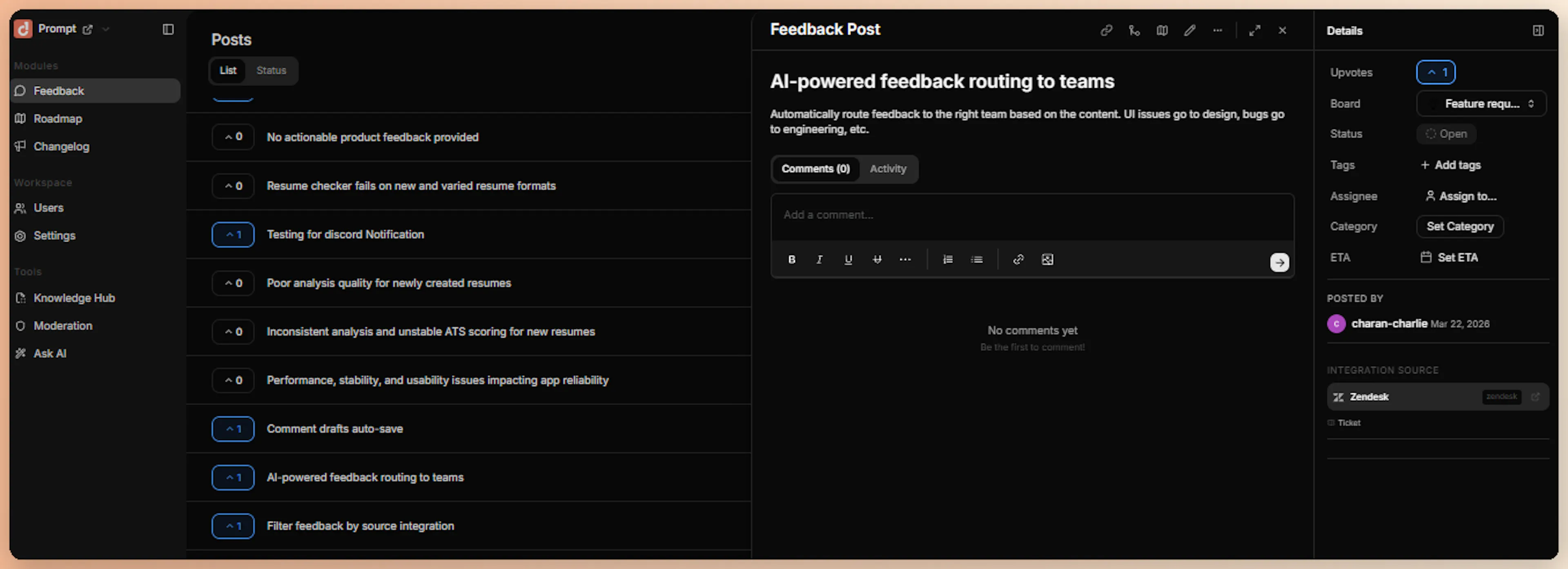
When you link a ticket to an existing feedback post, the link is stored and shown on the feedback post's detail view.
2. Automatic Ticket Analysis
When a ticket reaches solved or closed status in Zendesk, ProductBridge receives a webhook event. It fetches the full ticket — including all comments and requester information — and runs it through the AI pipeline to determine whether the ticket contains actionable product feedback.
Tickets with product feedback (feature requests, bug reports, UX complaints, performance issues, integration requests) automatically become feedback posts. Routine support resolutions — password resets, billing inquiries, account questions — are silently discarded.
Agents can also create feedback posts manually from the Zendesk sidebar app without going through the AI pipeline — the post is created instantly with the title and description they provide.
Automatic analysis runs only on solved and closed tickets. There are no capture modes or ticket filters — all solved and closed tickets are analyzed uniformly.
Historical Import
Historical import is optional and off by default. When connecting, toggle on Import historical data and pick a window between 1 and 30 days to backfill solved and closed tickets from that period. Each ticket from the window is queued for AI analysis and becomes a feedback post if it contains feedback.
If you leave the toggle off, ProductBridge only analyzes tickets solved or closed after you connect.
You can see import progress in the integration settings page.
Historical import runs in the background and can take from a few minutes to several hours depending on ticket volume. New tickets from the moment of connection onward are processed in near real time via webhooks.
How Feedback Is Processed
All Zendesk feedback — whether from the sidebar app or automatic ticket analysis — flows through ProductBridge's AI pipeline:
| Stage | What Happens |
|---|---|
| Normalize | Ticket subject, description, public comments, requester info, tags, priority, satisfaction rating, and channel (email/web/phone/chat/API) are combined into a structured format |
| Detect | LLM determines if the ticket contains product feedback. Confidence rises for low satisfaction ratings, escalated priority, feature-request/bug tags, and multi-comment discussions. Skipped for sidebar app submissions — confidence is auto-set to 0.95 |
| Extract | LLM extracts title, description, sentiment, priority, feature area, pain points, and customer context (technical level, user role, company tier) |
| Deduplicate | Semantic search (Voyage AI + Qdrant) checks for similar existing posts. If similarity ≥ 0.85, votes on the existing post instead of creating a duplicate |
| Organize | LLM assigns the right board, category, and tags |
Zendesk feedback is tagged with source: zendesk and source_type: integration (or source_type: manual for sidebar submissions). The original Zendesk ticket URL is stored in the post's metadata so you can jump from a feedback post back to the source conversation.
Priority escalation factors specific to Zendesk:
-
Satisfaction rating of "bad" or low score boosts priority
-
High or urgent ticket priority maps to elevated feedback priority
-
Enterprise organization or paid customer tier adds priority weight
-
Bug reports and performance issues are bumped one tier
Security
The Zendesk integration verifies every incoming webhook using HMAC-SHA256 signatures. Each request from Zendesk includes:
-
X-Zendesk-Webhook-Signature— Cryptographic signature -
X-Zendesk-Webhook-Signature-Timestamp— Unix timestamp
ProductBridge validates the signature by computing HMAC-SHA256 over the timestamp and raw request body, then comparing against the header value using constant-time comparison. Any request that fails signature verification is rejected before processing.
Access tokens, refresh tokens, and subdomain credentials are all encrypted at rest using Fernet symmetric encryption with a server-managed key. If a refresh token is available, ProductBridge proactively refreshes the access token 5 minutes before expiry so the integration never silently breaks due to token expiration.
Limitations
-
Historical import is capped at 30 days — The optional import at connect time covers at most the 30 days before connection. Older tickets cannot be imported retroactively
-
Public comments only — Internal notes and private comments are not included in AI analysis
-
Side conversations not supported — Side conversations within tickets are not captured
-
One Zendesk account per organization — Connect a different ProductBridge organization for each Zendesk account
-
Forum and community posts not captured — Only support tickets are analyzed; Zendesk Guide posts and community content are not processed
-
Historical import runs once — It happens only at connect time, and only if you enabled the toggle. To import a different window, disconnect and reconnect
Disconnect
To disconnect Zendesk, open Connect Sources > Zendesk and click Disconnect. ProductBridge:
-
Deletes the Zendesk trigger registered during setup
-
Deletes the "ProductBridge Feedback" webhook from Zendesk
-
Uninstalls the ProductBridge sidebar app from your Zendesk workspace
-
Marks the integration as
disconnected -
Stops processing incoming webhook events
Existing feedback posts remain in ProductBridge — only the live connection is removed.